Validate · competence management for rail, utilities, telecoms and highways
For employers in rail, utilities, telecoms, highways and construction. A card scheme tells you what somebody holds. Whether they are authorised to do your work, on your job, today, is your decision and your Authority to Work. Validate holds that record for your whole workforce, and it never calls somebody cleared on data it cannot stand behind.
No sign-in, nothing saves. Or start your free year: up to 100 people, no card.
Where Sentinel stops
Sentinel is the rail industry's competence card, and its own scheme rules require every sponsor to run a competence management system of its own. That system is where your authority to work lives: which roles need which tickets, who signed each person off, what they must not do, and who is on tonight's job. Validate is that system, for rail and for every other sector you work in. It sits alongside Sentinel. It does not replace it and it does not connect to it.
A scheme card proves a ticket in one sector. A site gate checks it. That is where its job ends.
Your role requirements, your named sign-off, your restrictions and your right to stop someone today. That record is yours to keep.
A principal contractor wants tonight's roster the day before, not a queue of cards at the gate. Validate sends it.
How it works
Download a template filtered to your industry: one row per person, one column per ticket, the expiry date in the cell. Upload it and a preview shows exactly what will change before anything is written. Export gives you the same file back, so the sheet you keep and the register never disagree.
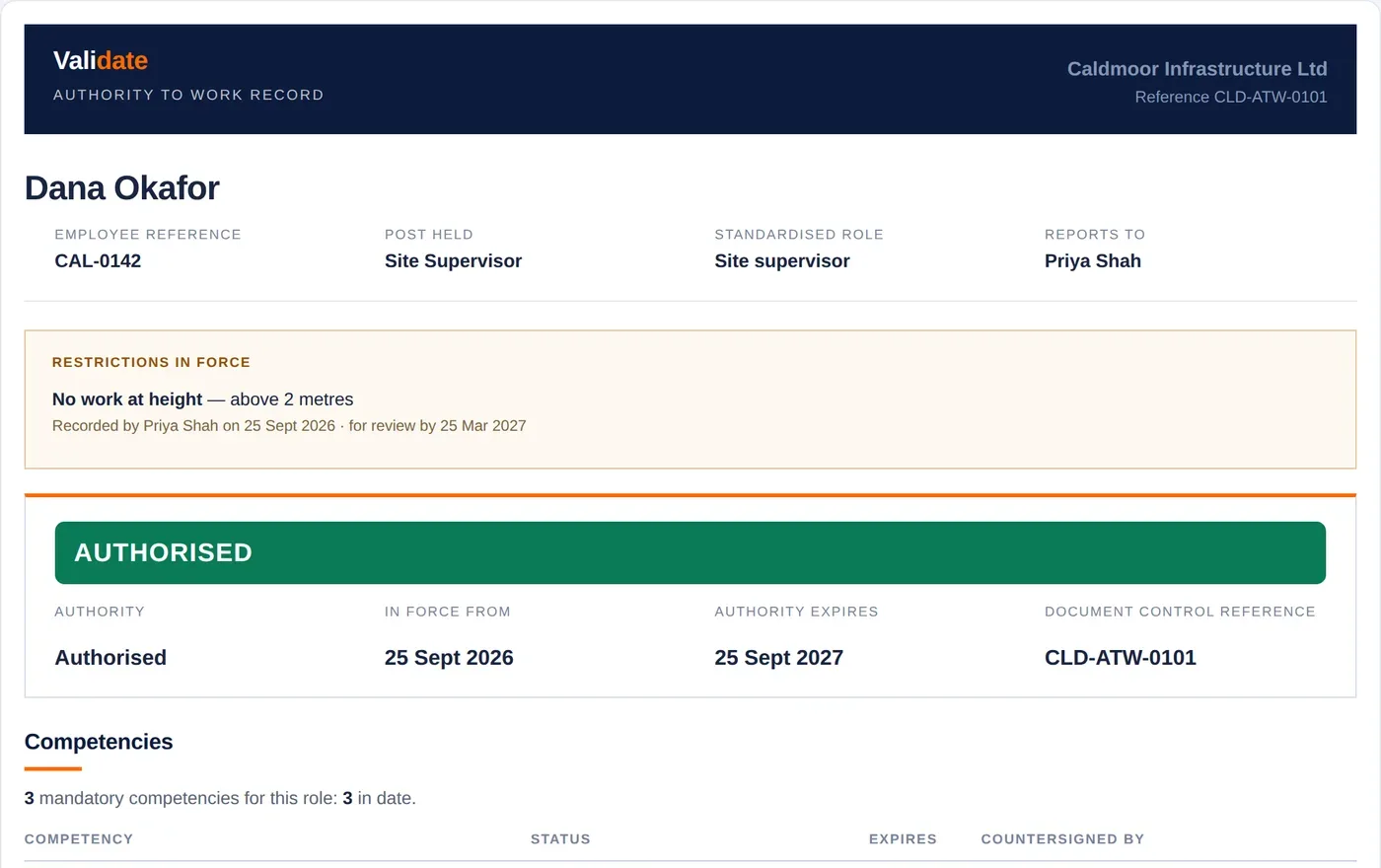
Raise an Authority to Work and the approvers you name sign it off in the product: the line manager by default, plus a second approver such as a subject expert if you want one. Nobody approves their own. Document control files it under a reference. Record a restriction such as no work at height without ever holding the medical reason, and stop an authority the moment you need to. Print the record and it shows who approved and when.
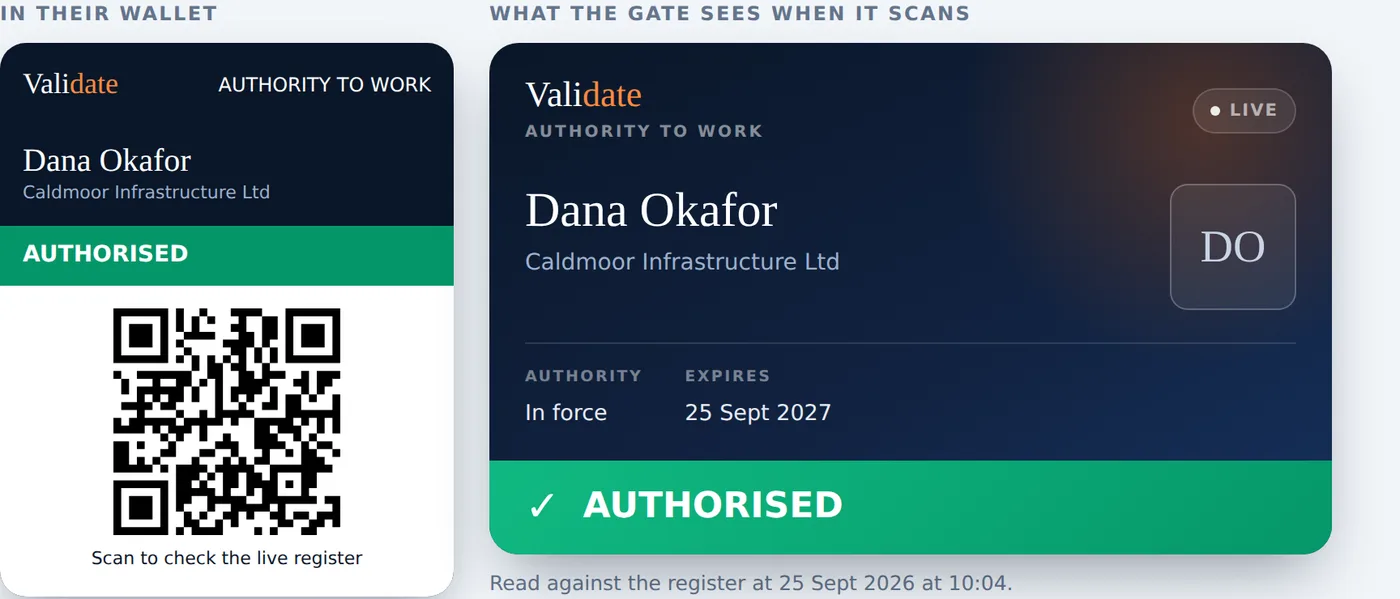
Each person can add their Authority to Work to Apple Wallet or Google Wallet, with their photograph on it. Scan the QR at the gate and the live register answers in words anyone can read in bad light: Authorised, Check record or Not authorised. Nothing on the phone goes stale, because the scan reads the register, not the card.
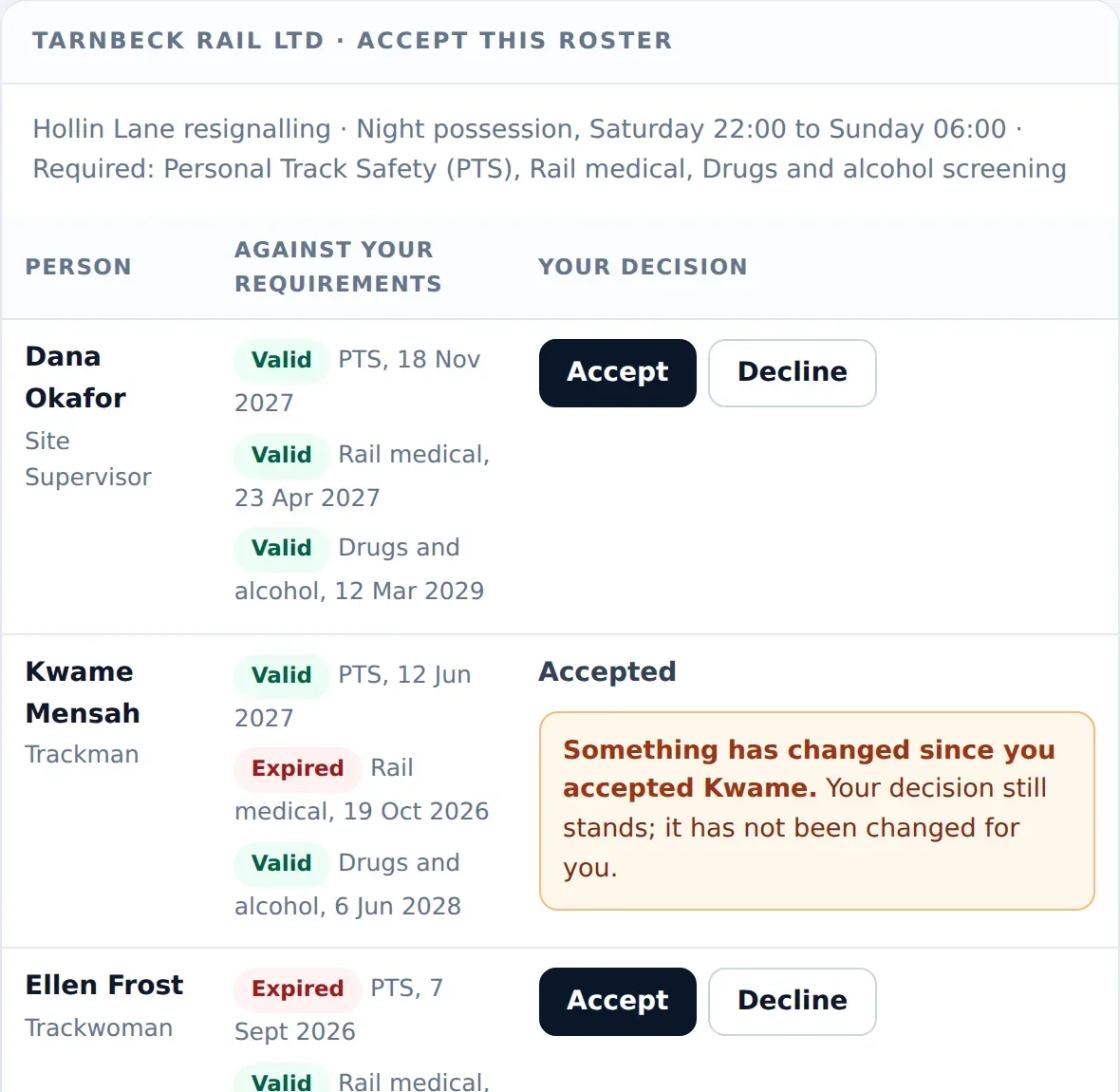
Build the roster for a job and send the principal contractor a link. They accept or decline each person against their own requirements, with no account to create. If a ticket lapses after they have accepted someone, their page tells them. People they take on carry forward to their client above, showing only name, post and whether their Authority to Work is in force, live, until you end it.
See it
Why it holds up
Every requirement reads as one of five states: in date, inside the reminder window, expired, held but unconfirmed, or not held at all. Validate rolls them into one verdict and refuses to round up. If anything mandatory is short, the person is not cleared, full stop.
The person sees their own record. A line manager sees everyone in their reporting line and can sign off, restrict or stand someone down. Your administrator sees the organisation. A client sees only what their job asked for.
The holder hears first, then their line manager, and your compliance lead always hears when a ticket expires. Nothing sends until you switch it on.
For medicals, screening and vetting the register holds that the clearance is in place and when it runs out. It never holds the report behind it.
Pricing
| Validate seats | Who | Per person / yr |
|---|---|---|
| Seat | 1 to 1000 people who sign in | £20 |
| Register place | Anyone who never signs in | Free |
| Larger teams | Over 1000 | Talk to us |
All prices are final. No VAT is added: Module Six is not currently VAT registered.
A seat is for anyone who signs in, whether they run the full compliance workspace or only see their own Authority to Work. It belongs to you, and a leaver's seat comes back to you. Putting people on the register costs nothing, however many you hold, so load the whole workforce and buy seats for the people who sign in.
Every seat gets every feature. Over 1000 people, or want an invoice? The shop handles invoicing at shop.modulesix.io, or talk to us.
Common questions
Sentinel is the card and the central record for rail access. Its scheme rules still require every sponsor to run its own competence management system, identifying the training, assessment and mentoring each person needs and checking they are competent for the task.
Validate is that system. It holds your role requirements, your named sign-off, your restrictions and your rosters, and it covers the work you do outside rail on the same register. You keep Sentinel for rail access. Validate does not replace it and does not connect to it.
An Authority to Work, often shortened to ATW, is your written permission for a named person to do a specific kind of work for you. It rests on three things: they hold the tickets and licences the work needs, those are in date, and someone in your organisation has signed them off as competent and fit to do it.
It is what a competence management system produces. Validate keeps that answer live for a whole workforce, and puts it in each person's wallet.
Yes. Download the template, filtered to your industry, and fill in one row per person with the expiry date under each ticket they hold. The upload shows a preview of every change before it writes anything. Nothing you load is marked as verified until a manager countersigns it, and nobody is removed because they are missing from a file.
Only what that job asked for: each person on the roster, measured against the requirements the client set, item by item, for as long as the window is open. People the client takes onto their own project are then visible to them by name, post and whether their Authority to Work is in force, and nothing else. You can end that at any time.
A training matrix records what people have completed. It goes stale the day it is printed and says nothing about expiry until somebody re-reads every row.
Validate holds the expiry dates, sends the reminders and answers the operational question directly: who is authorised right now, and who is not. If the evidence is missing or out of date, it says so rather than assuming.
Anything with a holder and an expiry: safety-critical tickets, plant and machinery licences, medical and screening clearances, security vetting, and your own internal authorisations. The library holds over 200 of them, and you can add your own.
No. Validate is a standalone product bought by an employer for its own workforce. It needs no membership, no professional body and no other Module Six product.
The records are your organisation's records about your own people. For those, your organisation is the data controller and Module Six is your processor, under the agreement at modulesix.co.uk/dpa.
Yes. The register is about who is authorised to do work for you, not who is on your payroll.
Get started
Download the template, fill it in, upload it, and switch invites on when you are ready. Authority recomputes as you go.
Start your free year See the demo